Chrome Developer Tools - monitorEvents
I have been playing with the Chrome Developer Tools lately. Here is a cool feature I didn’t know about.
There are many times I have run some code in the console simply to bind to an event and simply log the result.
$("body").bind("click mousedown", function(e) {
    console.log(e);
});
There is a built in alternative called monitorEvents. Here is a quick demo on how to use it:
Inspect an element (see screenshot). Now that it has been inspected, there is a $0 variable available in the console.
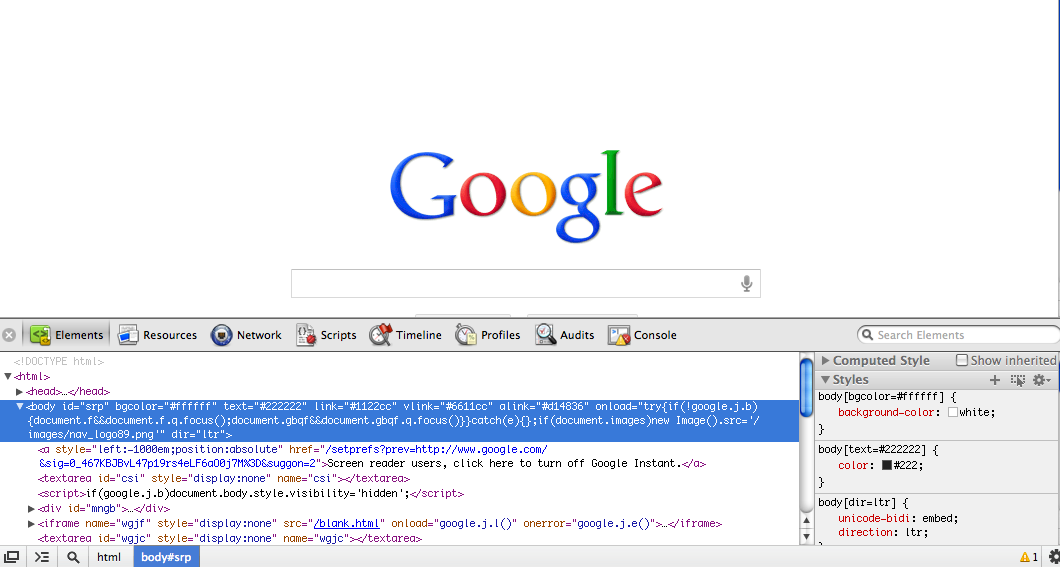
Instead of that extra bind, you can just type this into the console:
monitorEvents($0, 'mouse')
Which, if you have the body selected in the Elements panel, is equivalent to typing:
monitorEvents(document.body, 'mouse')
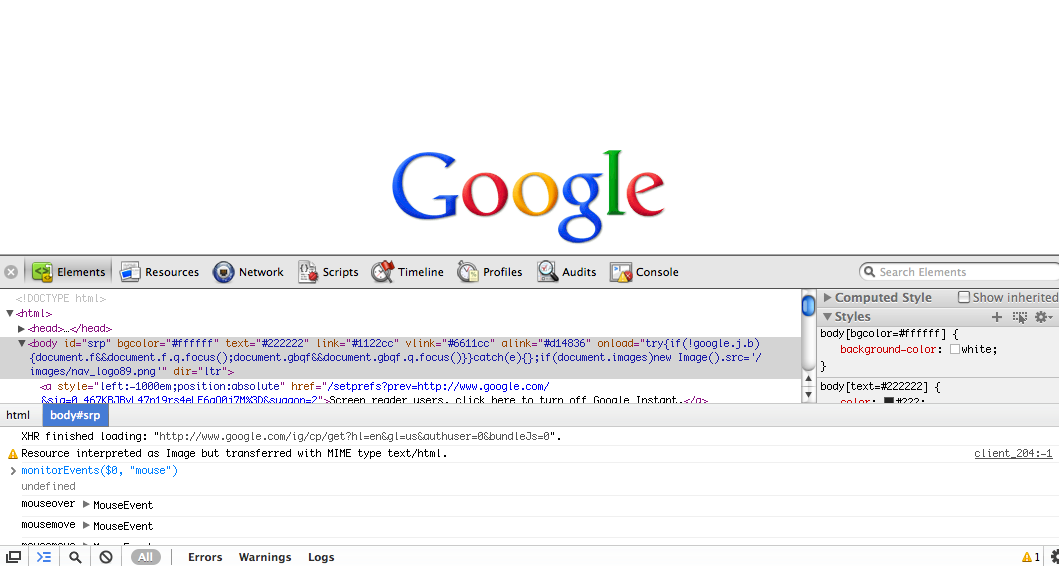
OK, now that you can see all these events in the console and you have tracked down your issue, you probably want them to stop! Luckily, there is an unmonitorEvents function to do this.
unmonitorEvents(document.body)
You can also use ‘key’ instead of ‘mouse’ if you are tracking key events. There are actually a number of second parameters, but the support between Firebug and Devtools varies.
Possible Arguments For Firebug’s monitorEvents
Via the Firebug command line API
composition contextmenu drag focus form key load mouse mutation paint scroll text ui xul
Possible Arguments For DevTools monitorEvents
Thanks to Paul Irish dropping by in the comments and linking to the source, we now know all the officially supported DevTools keywords:
mouse key touch control
Map of Events for DevTools monitorEvents:
mouse:  "mousedown", "mouseup", "click", "dblclick", "mousemove", "mouseover", "mouseout", "mousewheel"
key: "keydown", "keyup", "keypress", "textInput"
touch:  "touchstart", "touchmove", "touchend", "touchcancel"
control:  "resize", "scroll", "zoom", "focus", "blur", "select", "change", "submit", "reset"
no arguments: all of the above + "load", "unload", "abort", "error", "select", "change", "submit", "reset", "focus", "blur", "resize", "scroll", "search", "devicemotion", "deviceorientation"
April 17th, 2012 at 9:13 pm
Here’s the source of monitorEvents:
http://code.google.com/codesearch#OAMlx_jo-ck/src/third_party/WebKit/Source/WebCore/inspector/InjectedScriptSource.js&exact_package=chromium&q=monitorevents%20lang:%5Ejavascript$&type=cs&l=698
Which translates to…
* If the second argument is ‘mouse’, you’ll get all “mousedown”, “mouseup”, “click”, “dblclick”, “mousemove”, “mouseover”, “mouseout”, “mousewheel” events
* If the second argument is ‘key’, you’ll get all “keydown”, “keyup”, “keypress”, “textInput” events
* If the second argument is ‘touch’, you’ll get all “touchstart”, “touchmove”, “touchend”, “touchcancel” events. (See emulate touch events in devtools settings!!)
* If the second argument is ‘control’, you’ll get all “resize”, “scroll”, “zoom”, “focus”, “blur”, “select”, “change”, “submit”, “reset” events.
* If you don’t define a second argument, you’ll get all of the above, plus… “load”, “unload”, “abort”, “error”, “select”, “change”, “submit”, “reset”, “focus”, “blur”, “resize”, “scroll”, “search”, “devicemotion”, “deviceorientation” .
:)
April 18th, 2012 at 6:00 am
Thanks Paul!
Always more accurate to see the actual source to figure out support than just wild speculation :). I actually think I had tried to find this before but had limited my search to the front-end/ directory.
Up until now I have been using this link to view inspector source: http://trac.webkit.org/browser/trunk/Source/WebCore/inspector. But it always bothered me that I couldn’t search (for instances this these) – that code search is awesome. I will bookmark http://code.google.com/codesearch#OAMlx_jo-ck/src/third_party/WebKit/Source/WebCore/inspector/front-end/
April 18th, 2012 at 6:48 am
Awesome, thank you.
April 18th, 2012 at 8:28 am
Good find.
FYI: You can say “I ran” or “I have run” but you can’t say “I have ran” without sounding weird.
April 19th, 2012 at 4:22 pm
Brian, this is a great share! Thank you for doing the ground work here and sharing it out.
I didn’t know about either the $0 var that is created when you inspect an obj OR the monitorEvents/unmonitorEvents methods. Now I can detach a little from console.log.
April 19th, 2012 at 5:03 pm
Aaron,
Thanks! If you want more tips like these, check out some of the videos Paul Irish has made (where I learned about many of the devtools features). Watch this one first: http://www.youtube.com/watch?v=nOEw9iiopwI – it is definitely worth the 5 minutes. And I’ll keep posting tips here as I find them!
April 28th, 2012 at 1:41 am
Magento addon…
[…]Chrome Developer Tools – monitorEvents – Brian Grinstead[…]…
May 18th, 2012 at 5:38 am
[…] monitorEvents (англ.) — Немного о monitorEvents […]
April 8th, 2013 at 1:37 pm
23 Marzo 2013 alle 09:27…
Chrome Developer Tools – monitorEvents – Brian Grinstead…
April 16th, 2013 at 8:54 pm
[…] http://www.briangrinstead.com/blog/chrome-developer-tools-monitorevents […]
May 30th, 2013 at 2:32 am
I can’t get monitorEvents to work. It says monitorEvents isn’t defined.
May 30th, 2013 at 5:52 am
Leander,
You can only call monitorEvents from within the console. If you try to call it from your program you will get the “monitorEvents is not defined” error.
September 30th, 2013 at 7:56 am
thanks a lot bro
January 29th, 2014 at 4:54 am
[…] Source […]
July 2nd, 2014 at 1:50 am
Nice article, I have written a guide to help you all.
Let me know if you find it useful:
http://blog.vanamco.com/chrome-devtools-features-making-web-dev-efficient/
Thanks
September 1st, 2014 at 3:25 pm
[…] device. then launch debug tools. type monitorEvents(document.body,"touch") on the console, see this. now tap on the circle: sometimes the event target is img but at other times it is the canvas. […]
September 5th, 2014 at 8:30 am
[…] per How do I view events fired on an element in Chrome Web Developer? and http://www.briangrinstead.com/blog/chrome-developer-tools-monitorevents, I can use MonitorEvent to monitor events in chrome. However, I am not sure if this supports custom […]
September 5th, 2014 at 10:00 am
Does EventMonitor also support custom events?
For example, I have a custom event bound by jQuery using $(document).bind(‘connect’, function (ev, data) {//code here;});
but if I type monitorEvents($0, ‘connect’) into the console
I don’t see any monitored events, even though the event is most definitely triggered in my code.
Thanks!
C
September 5th, 2014 at 1:09 pm
Here is the current source code for it: https://chromium.googlesource.com/chromium/blink/+/master/Source/core/inspector/InjectedScriptSource.js#1578. In _normalizeEventTypes it looks like if it is not a recognized string (like ‘connect’), it will be added to the list of types to listen to anyway. So if the event could be detected with addEventListener I expect that it should also log.
September 5th, 2014 at 1:10 pm
Try adding something like this at the same time you do the monitorEvents and see if it logs: `$0.addEventListener(“connect”, function() {console.log(“connect”); });`
January 19th, 2015 at 5:45 pm
Looks like it doesn’t work anymore.
monitorEvents($0, 'mouse')doesn’t work any more.
March 12th, 2015 at 9:15 am
You can simply put monitorEvents(window, someEvent); Some event can be any function attached to a global object. (window events, jquery functions, any library you load etc)
March 19th, 2015 at 2:21 am
For those you directly need to know which event is on an element and where its location is in the code, Can use chrome extension
https://chrome.google.com/webstore/detail/visual-event/pbmmieigblcbldgdokdjpioljjninaim
April 15th, 2015 at 1:09 am
mouseenter , mouseleave are also supported . (41.0.2272.118 m)
June 2nd, 2015 at 7:11 pm
[…] can use monitorEvents […]
July 3rd, 2015 at 11:43 pm
thanks for sharing
July 14th, 2015 at 5:41 am
Awesome extensión Gajendra Singh, thanks for sharing.
March 14th, 2016 at 4:30 pm
[…] Chrome Developer Tools – monitorEvents […]
August 11th, 2016 at 2:14 pm
UPDATE: Paul’s original posted link is now 404.
I think the webkit source is now located at this location .. https://github.com/WebKit/webkit
And monitorEvents is located at this new location …. https://github.com/WebKit/webkit/blob/23b4f8ea1dfb537b9f82f366f2a738bdf85b86d1/Source/WebCore/inspector/CommandLineAPIModuleSource.js