A* Search Algorithm in JavaScript
June 2009Note that this code has been updated. I have an updated blog post detailing what changed. The new source code is available at https://github.com/bgrins/javascript-astar, and the code as of the original post is still available here: https://github.com/bgrins/javascript-astar/tree/0.0.1/original-implementation
I first implemented the A* algorithm for a research group I was in through school (Computer Graphics and Image Understanding). A* is a best-first, graph search algorithm. Some basic information can be found on the Wikipedia page for A* and the external links contained in it. Please refer to that page for general reference about the algorithm, I will simply explain in my own words how it works and how I got it working.
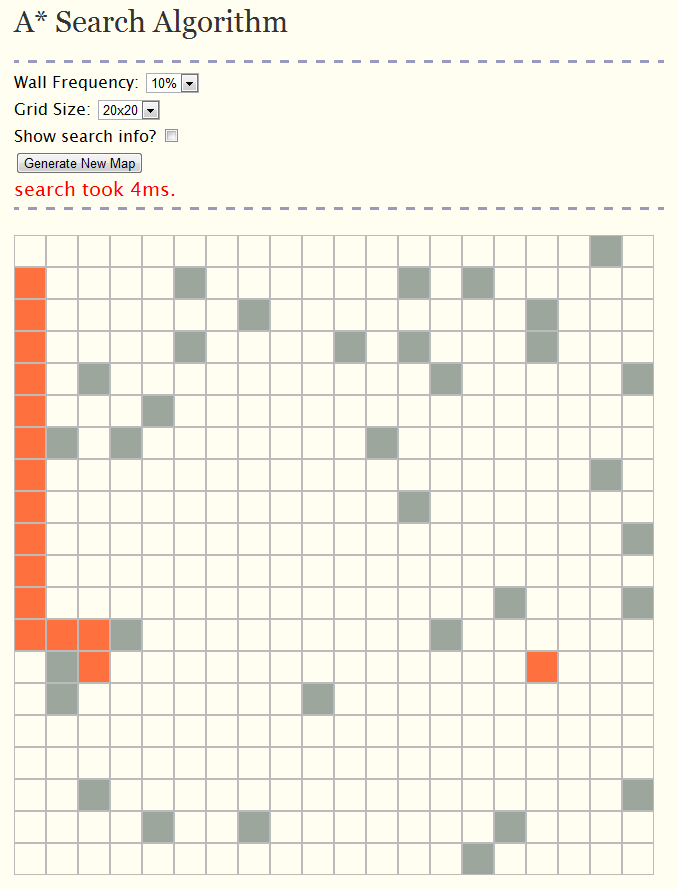
A* algorithm in JavaScript
Why JavaScript?
Because it was easy to deploy!
Since I know JavaScript pretty well, and most of the examples you can find are in C, Java or a similar language that you cannot run without downloading source code or executables, I thought it would be a good idea to program it on an html page. This way, people could see what was going on and view the source very easily by using the online demo.
My hope was to build a page that could be extended with other search algorithms by separating the UI code (that generates a graph with walls and animates the path that is determined by an algorithm), and the algorithm that finds the path. Maybe I will get around to plugging in some more algorithms sometime and making it into a little resource for graph search algorithms.
How?
search.html
Just a basic html file that includes jQuery, the excellent JavaScript library, main.css, graph.js, and astar.js. Also, I have a JavaScript block that initializes the page.
graph.js
The point of this file is to build the graph, call the search function, and animate the results after the search has returned. It also has an option to show the debugging information created by the search algorithm. I won't get too into the code here, since it distracts from the search algorithm.
Please take a look at it, be aware that there are some improvements I would make if I was to rewrite this today. There are some performance issues that could be addressed, and It modifies the Array.prototype to add on specific methods (findGraphNode and removeGraphNode) for search algorithms, which may not be ideal for bigger projects. For this little page, I'm not too worried about it, but if I do get around to adding in more algorithms, I will probably improve this code.
astar.js
This is the actual implementation of the algorithm. I will do my best to explain what is going on, but feel free to just look at the source of the example, or just download astar.js.
There are three functions that we keep track of for nodes that we look at:
- g(x): The total cost of getting to that node (pretty straightforward). If we reach a node for the first time or reach a node in less time than it currently took, then update the g(x) to the cost to reach this node.
- h(x): The estimated time to reach the finish from the current node. This is also called a heuristic. We online need to update this if it is not set already, since the distance to the finish will not change even if the path we took to arrive at a node changes. Note: There are many different ways to guess how far you are from the end, I use the Manhattan distance in this implementation.
- f(x): Simply g(x) + h(x). The lower the f(x), the better. Think about it like this: the best node is one that takes the least total amount of time to arrive at and to get to the end. So, a node that took only 1 step to arrive at and 5 to get to the end is more ideal than one that took 10 to arrive and and only 1 to get to the end.
Here is some high level pseudocode of what is happening in the algorithm. Also see the Wikipedia pseudocode for another example.
push startNode onto openList
while(openList is not empty) {
 currentNode = find lowest f in openList
 if currentNode is final, return the successful path
 push currentNode onto closedList and remove from openList
 foreach neighbor of currentNode {
     if neighbor is not in openList {
            save g, h, and f then save the current parent
            add neighbor to openList
     }
     if neighbor is in openList but the current g is better than previous g {
             save g and f, then save the current parent
     }
 }
Here is the JavaScript for the list implementation:
var astar = {
  init: function(grid) {
    for(var x = ; x < grid.length; x++) {
      for(var y = ; y < grid[x].length; y++) {
        grid[x][y].f = ;
        grid[x][y].g = ;
        grid[x][y].h = ;
        grid[x][y].debug = "";
        grid[x][y].parent = null;
      }
    }
  },
  search: function(grid, start, end) {
    astar.init(grid);

    var openList   = [];
    var closedList = [];
    openList.push(start);

    while(openList.length > ) {

      // Grab the lowest f(x) to process next
      var lowInd = ;
      for(var i=; i<openList.length; i++) {
        if(openList[i].f < openList[lowInd].f) { lowInd = i; }
      }
      var currentNode = openList[lowInd];

      // End case -- result has been found, return the traced path
      if(currentNode.pos == end.pos) {
        var curr = currentNode;
        var ret = [];
        while(curr.parent) {
          ret.push(curr);
          curr = curr.parent;
        }
        return ret.reverse();
      }

      // Normal case -- move currentNode from open to closed, process each of its neighbors
      openList.removeGraphNode(currentNode);
      closedList.push(currentNode);
      var neighbors = astar.neighbors(grid, currentNode);

      for(var i=; i<neighbors.length;i++) {
        var neighbor = neighbors[i];
        if(closedList.findGraphNode(neighbor) || neighbor.isWall()) {
          // not a valid node to process, skip to next neighbor
          continue;
        }

        // g score is the shortest distance from start to current node, we need to check if
        //   the path we have arrived at this neighbor is the shortest one we have seen yet
        var gScore = currentNode.g + 1; // 1 is the distance from a node to it's neighbor
        var gScoreIsBest = false;


        if(!openList.findGraphNode(neighbor)) {
          // This the the first time we have arrived at this node, it must be the best
          // Also, we need to take the h (heuristic) score since we haven't done so yet

          gScoreIsBest = true;
          neighbor.h = astar.heuristic(neighbor.pos, end.pos);
          openList.push(neighbor);
        }
        else if(gScore < neighbor.g) {
          // We have already seen the node, but last time it had a worse g (distance from start)
          gScoreIsBest = true;
        }

        if(gScoreIsBest) {
          // Found an optimal (so far) path to this node.   Store info on how we got here and
          //  just how good it really is...
          neighbor.parent = currentNode;
          neighbor.g = gScore;
          neighbor.f = neighbor.g + neighbor.h;
          neighbor.debug = "F: " + neighbor.f + "<br />G: " + neighbor.g + "<br />H: " + neighbor.h;
        }
      }
    }

    // No result was found -- empty array signifies failure to find path
    return [];
  },
  heuristic: function(pos0, pos1) {
    // This is the Manhattan distance
    var d1 = Math.abs (pos1.x - pos0.x);
    var d2 = Math.abs (pos1.y - pos0.y);
    return d1 + d2;
  },
  neighbors: function(grid, node) {
    var ret = [];
    var x = node.pos.x;
    var y = node.pos.y;

    if(grid[x-1] && grid[x-1][y]) {
      ret.push(grid[x-1][y]);
    }
    if(grid[x+1] && grid[x+1][y]) {
      ret.push(grid[x+1][y]);
    }
    if(grid[x][y-1] && grid[x][y-1]) {
      ret.push(grid[x][y-1]);
    }
    if(grid[x][y+1] && grid[x][y+1]) {
      ret.push(grid[x][y+1]);
    }
    return ret;
  }
};
And here is a faster implementation, using a Binary Heap instead of a list. This is a lot faster and also includes the option to search diagonally - 8 directional movement. Head over to the astar graph search project page to get the latest version of the code!
var astar = {
    init: function(grid) {
        for(var x = , xl = grid.length; x < xl; x++) {
            for(var y = , yl = grid[x].length; y < yl; y++) {
                var node = grid[x][y];
                node.f = ;
                node.g = ;
                node.h = ;
                node.cost = 1;
                node.visited = false;
                node.closed = false;
                node.parent = null;
            }
        }
    },
    heap: function() {
        return new BinaryHeap(function(node) {
            return node.f;
        });
    },
    search: function(grid, start, end, diagonal, heuristic) {
        astar.init(grid);
        heuristic = heuristic || astar.manhattan;
        diagonal = !!diagonal;

        var openHeap = astar.heap();

        openHeap.push(start);

        while(openHeap.size() > ) {

            // Grab the lowest f(x) to process next.  Heap keeps this sorted for us.
            var currentNode = openHeap.pop();

            // End case -- result has been found, return the traced path.
            if(currentNode === end) {
                var curr = currentNode;
                var ret = [];
                while(curr.parent) {
                    ret.push(curr);
                    curr = curr.parent;
                }
                return ret.reverse();
            }

            // Normal case -- move currentNode from open to closed, process each of its neighbors.
            currentNode.closed = true;

            // Find all neighbors for the current node. Optionally find diagonal neighbors as well (false by default).
            var neighbors = astar.neighbors(grid, currentNode, diagonal);

            for(var i=, il = neighbors.length; i < il; i++) {
                var neighbor = neighbors[i];

                if(neighbor.closed || neighbor.isWall()) {
                    // Not a valid node to process, skip to next neighbor.
                    continue;
                }

                // The g score is the shortest distance from start to current node.
                // We need to check if the path we have arrived at this neighbor is the shortest one we have seen yet.
                var gScore = currentNode.g + neighbor.cost;
                var beenVisited = neighbor.visited;

                if(!beenVisited || gScore < neighbor.g) {

                    // Found an optimal (so far) path to this node.  Take score for node to see how good it is.
                    neighbor.visited = true;
                    neighbor.parent = currentNode;
                    neighbor.h = neighbor.h || heuristic(neighbor.pos, end.pos);
                    neighbor.g = gScore;
                    neighbor.f = neighbor.g + neighbor.h;

                    if (!beenVisited) {
                        // Pushing to heap will put it in proper place based on the 'f' value.
                        openHeap.push(neighbor);
                    }
                    else {
                        // Already seen the node, but since it has been rescored we need to reorder it in the heap
                        openHeap.rescoreElement(neighbor);
                    }
                }
            }
        }

        // No result was found - empty array signifies failure to find path.
        return [];
    },
    manhattan: function(pos0, pos1) {
        // See list of heuristics: http://theory.stanford.edu/~amitp/GameProgramming/Heuristics.html

        var d1 = Math.abs (pos1.x - pos0.x);
        var d2 = Math.abs (pos1.y - pos0.y);
        return d1 + d2;
    },
    neighbors: function(grid, node, diagonals) {
        var ret = [];
        var x = node.x;
        var y = node.y;

        // West
        if(grid[x-1] && grid[x-1][y]) {
            ret.push(grid[x-1][y]);
        }

        // East
        if(grid[x+1] && grid[x+1][y]) {
            ret.push(grid[x+1][y]);
        }

        // South
        if(grid[x] && grid[x][y-1]) {
            ret.push(grid[x][y-1]);
        }

        // North
        if(grid[x] && grid[x][y+1]) {
            ret.push(grid[x][y+1]);
        }

        if (diagonals) {

            // Southwest
            if(grid[x-1] && grid[x-1][y-1]) {
                ret.push(grid[x-1][y-1]);
            }

            // Southeast
            if(grid[x+1] && grid[x+1][y-1]) {
                ret.push(grid[x+1][y-1]);
            }

            // Northwest
            if(grid[x-1] && grid[x-1][y+1]) {
                ret.push(grid[x-1][y+1]);
            }

            // Northeast
            if(grid[x+1] && grid[x+1][y+1]) {
                ret.push(grid[x+1][y+1]);
            }

        }

        return ret;
    }
};
Conclusion
This A* search implementation could be used as a component to larger system (like a game - maybe tower defense or puzzle), or just for learning purposes. I have done my best to make the code understandable and to present the concepts in a way that would help someone who has never seen the algorithm before, or someone who is not very familiar with JavaScript.
Feel free to view the demo, or download the latest version of the astar.js file to mess around with it. Check out the javascript-astar project page on Github for the latest code and documentation.
May 20th, 2013 at 5:42 am
Sam,
If you use the
diagonaloption it can move similarly to Euclidean Free. Basically, pass true as the 4th parameter to astar.search. By default it uses the Manhattan heuristic, but if you’d rather use Euclidean, you could write your own callback and pass it in as the 5th parameter.May 20th, 2013 at 9:32 am
hey :) the basic code worked like “EuclideanFree”, so I extended the ifs for “Euclidean” like in the exsample post before
im not 100% for mistakes but the test looks good ^^
all you have to do now is to say “Euclidean” oder “EuclidianFree” at the 4th parameter
if (diagonals == “Euclidean”) { //new mode
// Southwest
if (grid[x-1] && grid[x-1][y-1])
{
//push if no wall in the south and no wall in the west
if(!(grid[x][y-1].closed || grid[x][y-1].isWall()) && !(grid[x-1][y].closed || grid[x-1][y].isWall()))
{
ret.push(grid[x-1][y-1]);
}
}
// Southeast
if(grid[x+1] && grid[x+1][y-1])
{
//push if no wall in the south and no wall in the east
if (!(grid[x][y-1].closed || grid[x][y-1].isWall()) && !(grid[x+1][y].closed || grid[x+1][y].isWall()))
{
ret.push(grid[x+1][y-1]);
}
}
// Northwest
if(grid[x-1] && grid[x-1][y+1])
{
//push if no wall in the north and no wall in the west
if (!(grid[x][y+1].closed || grid[x][y+1].isWall()) && !(grid[x-1][y].closed || grid[x-1][y].isWall()))
{
ret.push(grid[x-1][y+1]);
}
}
// Northeast
if(grid[x+1] && grid[x+1][y+1])
{
//push if no wall in the north and no wall in the east
if (!(grid[x][y+1].closed || grid[x][y+1].isWall()) && !(grid[x+1][y].closed || grid[x+1][y].isWall()))
{
ret.push(grid[x+1][y+1]);
}
}
}
else if (diagonals == “EuclideanFree”) { //basic mode
// Southwest
if(grid[x-1] && grid[x-1][y-1]) {
ret.push(grid[x-1][y-1]);
}
// Southeast
if(grid[x+1] && grid[x+1][y-1]) {
ret.push(grid[x+1][y-1]);
}
// Northwest
if(grid[x-1] && grid[x-1][y+1]) {
ret.push(grid[x-1][y+1]);
}
// Northeast
if(grid[x+1] && grid[x+1][y+1]) {
ret.push(grid[x+1][y+1]);
}
}
return ret;
}
};
May 31st, 2013 at 12:47 pm
Hi
Great code.
2 Questions:
How can I make the path line stay viable
How can I automatically make the path display when I pass an “end” value?
Thanks
August 20th, 2013 at 1:40 pm
It can be applied in a isometric grid, for games?
October 17th, 2013 at 5:49 pm
[…] in integrating A* algorithm. One of them is by AJ Piergiovanni (Rocketman) and the other one is by Brian Grinstead (JavaScript). I recommend both of them as well as A* Pathfinding for Beginners by Patrick […]
June 11th, 2014 at 1:34 am
Hi,
Please I’m a very Begginer student, unfurtunattely Working and studing…haven’t so time…..certainly I hope all your can understand my English.
Please , I’m From Chile, really i’will apreciate your assitance: I need:
1.To make Java progam in java :to Pathfinding a city usin Heuristik A star..with Grapho , using a Manhattan function. The example is using Texa’s map
At the end to show in display the searc results (we must to inform the distance…in exxample from amarillo to Ludbock= 119, WAKO-BRYAN = 85, ETC)
2-TO make another program in Java :
To get the path from the star to the end in a GRID (with obstacles black cells) the grid is like a tipical Square in a puzzle.
The search must use: a-Manhattan and b-Euclidean distances
….I believe in Miracle….please HELP ME…is URGENT…..best regards:Patricio
July 3rd, 2014 at 6:55 am
Great work man!
:)
thats uber-helping! :)
March 27th, 2015 at 9:13 pm
Brian,
Your online demo
https://bgrins.github.io/javascript-astar/demo/
is broken / has a few bugs.
1) Click any square to do a valid search (Even 1-2 squares away). Then after it finishes moving, click the original square you can from. That equates to an invalid path. If you turn on ‘show search info’ it appears you aren’t clearing things out between path searches.
2) When I click ‘use diagonals’ it doesn’t do what I expect. If I have squares
AB
CD
and I start in A and click D it still moves A-B-D or A-C-D rather than A-D.
Tim
March 27th, 2015 at 9:18 pm
Actually in regards to the 2nd problem of diagonals it appears that each time you regenerate the map it ‘forgets’ that diagonals were checked. So you have to uncheck-recheck that box for it to work. It makes the demo appear buggy when options aren’t remembered.
Tim
June 15th, 2015 at 7:29 am
[…] JS:[1][2][3] […]
July 29th, 2015 at 1:27 pm
Very clear explanation. Maybe you will like this set of visualizations for A* and forkeable example code, built with an algorithms visualization tool: https://thewalnut.io/visualizer/visualize/7/6/
September 14th, 2015 at 3:06 pm
Here anotaré tool to help understand IA algorithms. https://github.com/jalopezsuarez/aisearch
February 21st, 2016 at 2:35 am
Just for the culture, in programming languages the axis are not
[X][Y]
but
[Y][X]
Which make sense if you really think about it :
[
y0 = [x0,x1,x2],
y1 = [x0,x1,x2],
y2 = [x0,x1,x2]
]
Spend lot of time to understand why it was not working properly ^^
Thx anyway.
July 6th, 2016 at 5:29 pm
Hi!
First of all, thank you for your algorithm.
See: http://prntscr.com/bpqme4
My question is:
Why does it has all these little breaks if the cost would be the same as a rect? How can I have a more linear path?
I don’t know much about the A*, i implemented once but your code it’s so much faster haha.
Thanks in advance